
Customize where and when you receive calls to improve your business success
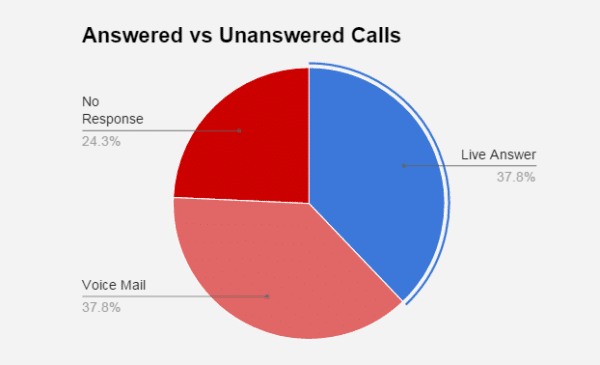
According to a study by 411Locals, small- and mid-size businesses let 62% of calls go unanswered. If a majority of your incoming calls are being missed or sent to voicemail, how much potential business are you losing?
Whether it’s a new revenue stream, an opportunity to upsell, or a client who’s on the verge of leaving, incoming calls often translate directly to revenue. Don’t miss an important connection from a partner, supplier or client because those missed calls can start to add up…
That being said, we understand why it happens! Many small- and medium-sized businesses don’t have multiple employees dedicated to answering the phone, and often the work you’re doing is offsite or requires a singular focus. It’s not possible to orient your workday around answering calls, nor should you have to.
One of the keys to never missing a call is selecting a phone system that was built with small- and medium-sized businesses in mind. Your phone system isn’t just utilitarian, it’s strategic!
More Ways to Answer!
The first way to never miss a call is to increase the places you’re able to receive a call. With the right phone system, you don’t have to be sitting at your desk or even focused on work to easily answer a call from a lead.
We built the smrtPhone platform with this in mind. We always want you to be near your smrtPhone, no matter what you’re doing. You can use smrtPhone’s Web App to easily make or receive a call. But even when you’re on another website, the Chrome Dialer ensures you never miss someone that’s trying to reach you. The smrtPhone extension turns your entire browser into a phone. It is with you wherever you use Chrome, and that means so is your contact information and notes.
On the go, your phone receives calls via the Mobile App. You have all of your CRM contacts and all of your smrtPhone phone numbers with you, right in your pocket.
Long gone are the days when one phone meant one number. Your supply vendors might reach you via one number, while a campaign in another zip code is funneling a new lead via a different number. Your Mobile App will get both calls, clearly identified. It’s important that you remain mobile and organized, and your phone system should help, not hinder in this pursuit.
Customizable Call Flows
Of course, you can’t always answer your phone, and that’s where customizable call flows come in. Let’s say you need to ignore an incoming phone call because you’re chatting with a client, but that call is still important: a custom call flow can ensure it’s routed to a different person at your company. If they’re not available, you choose who it goes to next, or have it sent to voicemail.
You control how many rings a caller will hear – whether you’re concerned with how long they’re on the line, or if you want to give yourself a couple more seconds before a call goes to voicemail, you determine the length of time. Automated messages can even be set up that are unique and personal to your company. Let your phone system do the work of sorting the type of call that’s coming in so you can focus on business.
Set Your Business Hours
A common reason calls go unanswered is because they’re received outside business hours. You can schedule where your calls go, 24 hours a day, each day of the week.
Think of this as another function of Call Flows, where depending on the hour or day, your calls can be routed to different people or groups. Maybe your virtual assistant or answering service start taking calls after 5 PM on weekdays – set that flow up once, and forget about having to do it again. Or set it in advance that when your business is called outside a certain time window, callers immediately get a pre-recorded message with information or voicemail instructions.
Don’t miss a lead just because you’re maintaining a much-needed work-life balance, or you’re with a client – your calls can be answered even when you’re off the clock!

Dial a Group
What’s an obvious way to increase the chances of a call being answered? Multiple people getting the call!
For example, maybe you have an accounting group where anyone is able to field questions about finance. Using our Simultaneous Call Feature, you can set up a designated finance group and have all relevant calls routed to them directly, either by having a unique phone number just for them, or a prompt system for callers. Whoever is able to answer first will simply handle the call, and it will stop ringing for everyone else.
This decreases the amount of time your caller will spend on the line, and increases the chance the call will get answered. Groups can be changed easily and be large or small – whatever works best for your company, and helps callers reach a real person fast.
Round Robin
Our Round Robin Feature allows you to control who gets called in a way that balances leads and workload among employees. This is especially important for commissioned employees who want to make sure they are getting their fair share of fresh leads.
Using the Round Robin feature, you ensure that each employee gets the same number of calls, as incoming calls are distributed evenly. This helps increase the chances a caller will reach a live person, while also controlling the spread of leads fairly between employees.
The ‘Sticky Agent’ feature works in tandem with Round Robin, where if a call comes in on a group number that has Round Robin, but that caller has spoken to a specific agent before, the system will first dial that known agent. This ensures consistency for customer experience, while still keeping new leads balanced between employees.
Flexible Notifications
Another important element to never missing a call is to have many options for notifications coming through to your devices whenever a call comes through. It doesn’t have to just be standard ringing on your main phone. The right system lets you decide where and when you’ll be notified – with visual and auditory cues that you set.
With smrtPhone, you control where the notifications come in, whether as desktop pop-ups, Chrome browser notifications, on your mobile phone, via email, or even on your smart watch!
Let’s say you’re a landscaper and your smart watch dings that a call is coming in – if it’s someone important, you know to drop what you’re doing and grab your phone. Or a desktop notification lets you know an important text came in that you’d been hoping for, it’s easy to respond immediately instead of wading through a ton of texts when you finally get back to your phone. The beauty of smrtPhone is not that you’re endlessly available, it’s that you’re discerning and strategic about how and when you’re reached.
Remember that you have control of where and how you get these notifications, and they all work separately, which allows for a customizable system of when and where you get your information. If you want pop-ups on your desktop, but not on your watch – that’s fine! Some people choose to have notifications everywhere possible, which can mean via Chrome browser notifications, on their phone, their watch, even via Email. The point is to decide where you want to be reachable, and when you want to keep your brain off work.
Sometimes calls can feel overwhelming …
Especially when you have multiple phone numbers and many people trying to reach you. Remember that smrtPhone is smart and it makes you smart too. You can see client notes and information about the last time someone called you, so when the call comes in, you have immediate context and can jump right in with knowledge.
You also don’t have to field every call: have the calls routed to the appropriate employee well before anyone is rung. Remember that never missing a call isn’t just about answering, but also being ready when you do answer.
Learn more here about whether smrtPhone can help you be ready!